

If you ship from Canada and use ShipStation, there’s a good chance you’ve turned on rate shopping, the setting that automatically picks the cheapest available rate for every order. It feels like free money. Flip a switch and let the software find the best deal. For most Canadian merchants, that’s not what happens.
When an order is ready to ship, ShipStation asks each carrier account you’ve connected what that shipment would cost, lists the answers side by side, and buys the label from whichever carrier your rules pick. So it chooses the cheapest rate already sitting in your account. It never makes a rate cheaper.
That’s a US feature that ShipStation switched on for Canada.
The rates it compares are the first problem. A Canadian merchant negotiating alone rarely has rates worth comparing, so the software ends up picking the best of a weak set.
The numbers describing those rates are the second problem, and three of them arrive at that side-by-side list wrong on Canadian shipments. Carriers don’t all report tax the same way, so one rate includes it and another doesn’t. ShipStation can’t tell whether a Canadian address is a house or a business, so it prices every delivery as a business delivery. And the whole calculation runs on the weight and dimensions somebody typed into the order, which may not match the box that actually goes out the door.
We manage shipping for 240+ Canadian e-commerce businesses at Part n Parcel, and most arrive having already turned rate shopping on, expecting shipping to be handled. Their costs per parcel usually come in close to what they were paying before.
Automation is what makes that expensive. Rate shopping applies the same decision to every order, so whatever it starts with gets repeated at the speed of your volume. Good rates and accurate package data save you money on every label. Weak rates and a wrong weight repeat the same overpayment once per shipment, for as long as the setting is switched on.
Rate shopping ranks your rates and never negotiates them
The rules are yours to set. You can tell it to pick the cheapest option, the fastest, or the best overall value, and you can tell it to favour a preferred carrier when that carrier comes within a few cents of the cheapest. Our companion guide on automating carrier selection rules in ShipStation walks through the setup itself.
It never negotiates. It reads the rates in your account and ranks them. It can’t call your FedEx rep and change how they charge you for box size, and it can’t lower a Purolator rate by a single cent. The rate it shows you is the rate you already had, because negotiation happens between people and a carrier’s sales team, not inside a label screen.
ShipStation is a great platform, and most of the Canadian merchants we work with run on it. Rate Shopper is available to accounts based in the United States, Canada, the United Kingdom, Australia, and New Zealand, and the customizable rules come with ShipStation’s Standard and Premium plans for merchants who signed up after July 2025. The feature works here.
A Canadian merchant can’t fix carrier rates alone
The obvious response is to negotiate your own rates and connect them to ShipStation. In its own documentation, ShipStation states that “any negotiated rates you have with your carrier will automatically appear” in the platform. It surfaces whatever you have negotiated. It doesn’t get you a better deal than you could reach on your own.
Carriers don’t publish their negotiated rates. That means you negotiate your rate card, the sheet of prices attached to your account, with no reference point for what a business your size pays. The carrier also decides which of its three sales tiers you belong to before the conversation starts:
- Web. Self-serve. Standard discounts off the list price, no named rep.
- Field. A shared rep and some room to negotiate.
- Enterprise. A named rep, a custom rate card, and someone with the authority to change your price.
We’ve negotiated Canadian carrier rates for a decade, and the enterprise tier starts at roughly $2M in annual spend. That threshold is per carrier, not per business, and most merchants miss the distinction. A company spending $3M a year on shipping sounds like it should qualify. Split evenly across three carriers, that’s $1M with each, which lands it in the self-serve tier at all three.
Splitting volume that way is still the right operational move, because no single carrier delivers well everywhere in Canada. It is also exactly what keeps a single merchant under the threshold at every carrier it uses.
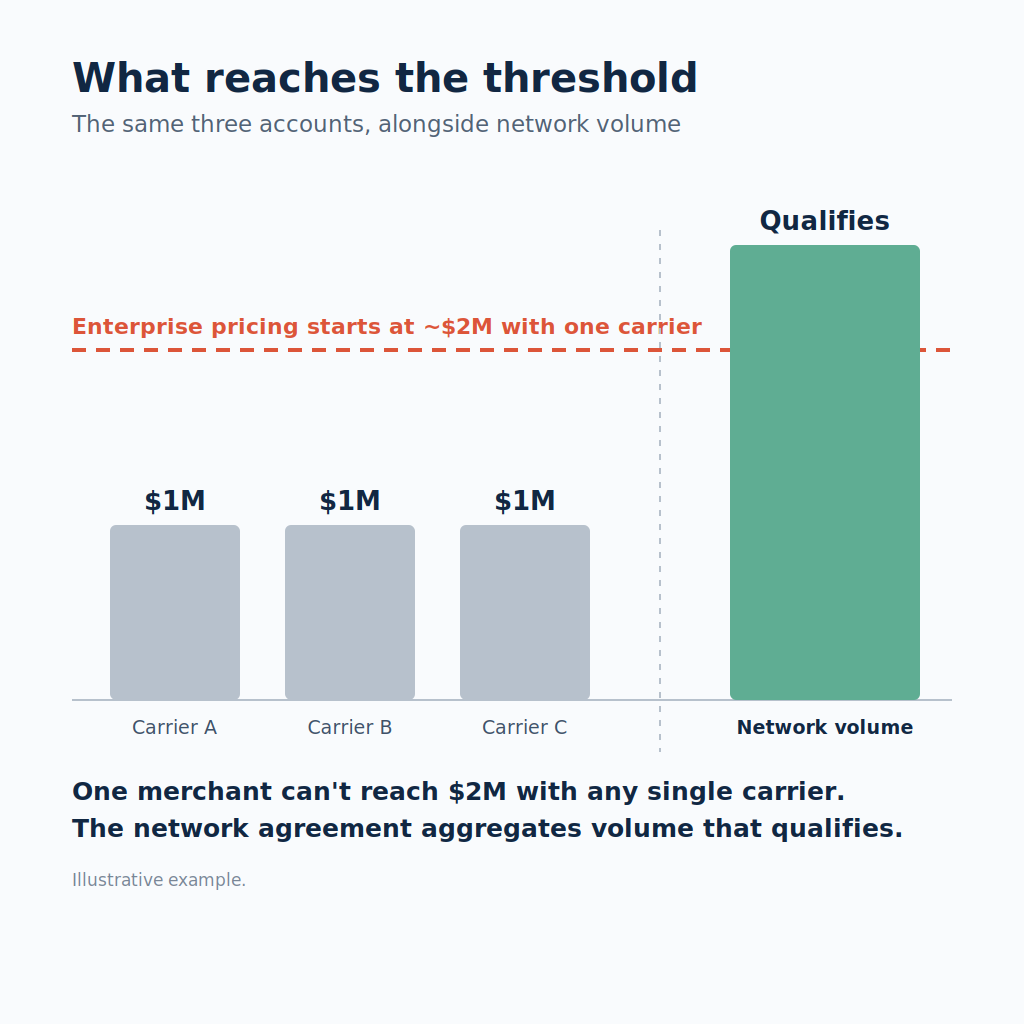
The moment you don’t own the carrier account, you’ve outsourced pricing power.
A rate shopper can’t change any of that. It ranks the rates your tier already got you. Reaching enterprise shipping rates as a Canadian small business is a volume problem, and volume is the one thing a single merchant can’t manufacture alone.
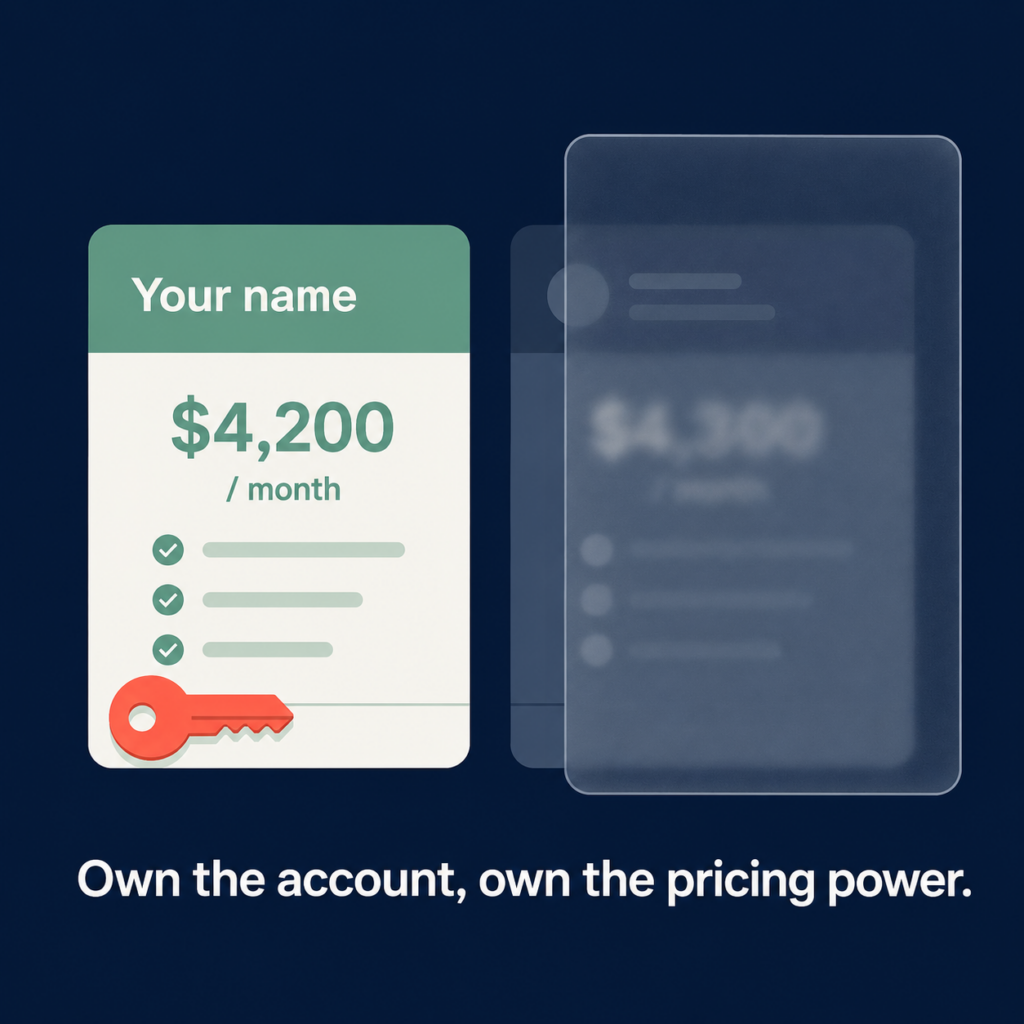
ShipStation built rate shopping for the US and switched it on in Canada
The savings ShipStation advertises for rate shopping are US savings. Its shipping page promises discounts of 80% to 90% with every major carrier, and the fine print on that same page states that “rates are limited to shipping from the U.S. only”. Those discounts come from US carrier programs, and USPS Commercial Pricing is a large part of them.
For a merchant shipping from Ohio, that’s an excellent deal. There is no USPS in Canada and no equivalent domestic discount pool, so on Canadian-origin shipments the rate shopper is mostly comparing rates you brought yourself.
ShipStation does now advertise a discount program for Canadian merchants. Through a fedex.ca enrollment, Canadian merchants can get up to 45% off select FedEx services and up to 40% off residential delivery surcharges. For a business shipping a few parcels a week, that discount is a fine place to start.
It’s priced off retail list rates, though, which are the most expensive rates a carrier publishes. Every headline discount in that 80% to 90% range is measured the same way. So an enrollment discount off list rates isn’t an enterprise rate card. It doesn’t change how the carrier charges you for box size, and it doesn’t waive peak-season surcharges or accessorials. Accessorials are the per-shipment add-on fees a carrier applies for things like residential delivery, remote areas and oversized boxes. It also doesn’t give you a direct commercial relationship with the carrier. The number that matters is what you actually pay per parcel, and signing up through a web form doesn’t lower that number the way a negotiated contract does.
So a Canadian merchant who turns on rate shopping expecting the savings ShipStation advertises is running the feature without the discounts behind those numbers. It compares the merchant’s own rates against each other and picks the least bad one.
From the invoices we review, mid-market Canadian merchants are commonly overpaying by around 30% against what their volume should command. Automating that comparison doesn’t shrink the 30%. It applies it to every order.
| Monthly shipping spend | Overpaying by ~30% | Lost per year |
| $20,000 | ~$6,000/mo | ~$72,000 |
| $35,000 | ~$10,500/mo | ~$126,000 |
| $50,000 | ~$15,000/mo | ~$180,000 |
You could find that 30% yourself by benchmarking your rates against what other Canadian merchants in your category pay.
Why Canadian rates arrive wrong before ShipStation ranks them
Even with strong rates in the account, three of the numbers feeding the rate comparison arrive wrong on Canadian shipments, and each one puts a figure on the screen that isn’t what the carrier ends up billing.
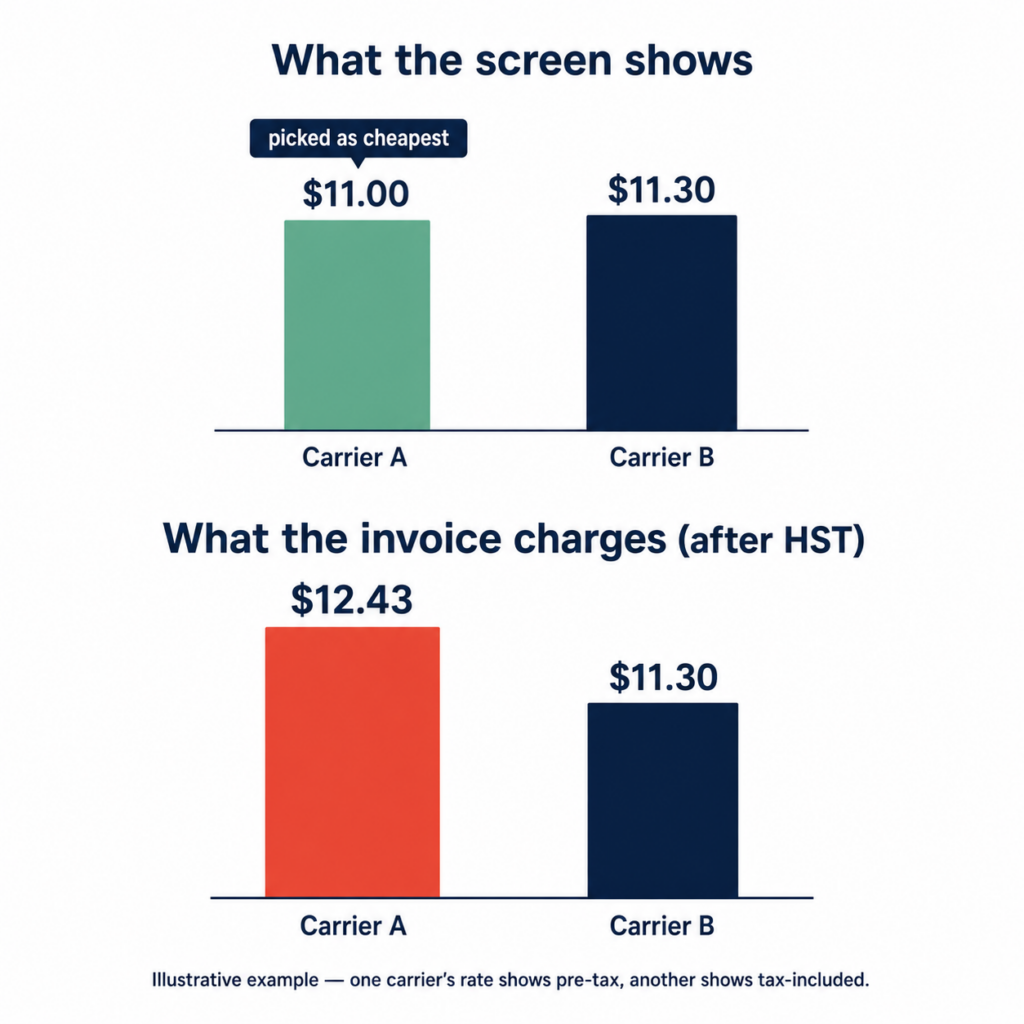
UPS comes in pre-tax and FedEx comes in with tax already in it
UPS rates come back into the rate comparison without GST or HST included, while FedEx rates come back with tax already in them. Merchants have documented it on ShipStation’s own community forum.
The rate shopper compares the two as if they were the same kind of number. So it might show UPS at $11.00 and FedEx at $11.30, pick UPS as the cheaper option, and move on. Once HST is applied, that UPS label is actually $12.43. You were shown the cheapest rate and charged the more expensive one.
The invoice makes it harder to catch, because ShipStation doesn’t break out GST and HST per shipment by default. Canadian merchants raise the same thing on ShipStation’s own community forum. Labels come back as a single total, the tax is not broken out shipment by shipment, and no report in the platform produces one.
That reporting gap costs real money. An input tax credit is the GST or HST you paid on a business expense and can claim back from the CRA, and claiming it means having the tax documented shipment by shipment. A single monthly total won’t support that, so the credit goes unclaimed, and tax you could have recovered never gets counted in what a label really costs you.
ShipStation has no setting that breaks tax out per label. On your own carrier accounts, FedEx and UPS bill you directly and itemize the tax on every shipment, which is the documentation an input tax credit claim needs.
Every Canadian address is treated as commercial
Carriers add a residential delivery surcharge to every parcel going to a house rather than a business, and ShipStation can’t tell which of your Canadian deliveries are which. The residential check is built on a US database. Its address validation documentation states that US orders get validated against the USPS address validation database, and other supported countries against the Melissa Database. Its rate discrepancy guidance states that “for non-US addresses, ShipStation cannot currently determine the residential/commercial status, so all estimated shipping rates for non-US addresses assume a commercial address.”
So a delivery to a house in Scarborough is priced as a commercial delivery in the rate comparison. The carrier classifies the address itself once the parcel moves, and the residential surcharge turns up on the invoice weeks later.
ShipStation flags the risk on the FedEx side. Its own guidance on setting FedEx services by address verification notes that “FedEx will charge an additional surcharge for FedEx Ground shipments that are delivered to a residential address, or FedEx Home Delivery shipments that are delivered to a commercial address,” and that the verification-based services it describes “are available in the US only.”
If you ship mostly to consumers, that surcharge lands on most of your orders, and none of it was in the rate comparison the software used to pick the carrier.
The rate is only as accurate as the package you describe
The third problem is the package itself, and it’s the only one of the three you control. Carriers bill on actual weight or dimensional weight, whichever is greater. Dimensional weight is what a carrier charges for the space a box takes up, so a large light parcel gets priced as though it were heavier than it is.
ShipStation’s rate discrepancy documentation states that “when dimensions are not included, ShipStation will only base the rate on weight,” and that if the carrier determines the dimensional weight is higher, “the carrier will charge you based on the dimensional weight and the estimated rate in ShipStation will be inaccurate.”
Leave the dimensions blank and the comparison prices every carrier on weight alone, with no dimensional weight and no oversize surcharge in any of the numbers. Type a weight that doesn’t match what goes out the door and every carrier gets priced on the weight you typed. Either way the screen still shows you a cheapest option, and it looks identical to a correct one. If you ship anything bulky relative to its weight, our guide to how carriers bill you for box size covers the arithmetic.
Carriers weigh and measure parcels themselves, and they re-price anything that doesn’t match what was declared. A carrier that looked cheapest on an under-described box can come back as the most expensive one on the invoice. Keeping the saved dimensions and weights accurate for every box you ship is part of the setup we build and maintain for the merchants we work with.
ShipStation’s own pricing page tells you who needs their own rates
On its Canadian pricing page, ShipStation lists “Bring your existing carrier accounts” among the features that arrive on Standard, on top of everything in Starter. Merchants on Starter mostly don’t have negotiated rates yet, so the feature has nothing to do for them. It sits on the paid tiers because that’s where the merchants with their own rate cards are.
Platform-supplied rates are the Starter answer, and they’re built for merchants who are still finding product-market fit. If shipping isn’t yet a meaningful cost line, simplicity makes sense. The ceiling appears the moment it becomes one.
Labels bought that way also arrive without the per-shipment tax breakdown, so the GST and HST on them is tax you can’t document and can’t claim back. That cost never reaches the rate comparison either.
Once you’re shipping more than about a thousand parcels a year, the rate you pay per parcel starts to set your margin on every order. A competitor shipping the same box to the same address on list rates pays more than you do, and that difference stays in your business. ShipStation’s own plan structure points in the same direction, toward direct carrier accounts, your own rates, and a rate comparison built on numbers you can check against an invoice.
Negotiate the rates first, then automate
We’d recommend taking these four steps in order, because each one changes what the next has to work with. Aim for the lowest cost per parcel across a month of shipping rather than the lowest number on any single label.
- Put direct carrier accounts in your name, at enterprise rates. This changes the numbers the rate shopper is choosing between, and it’s the foundation of any effort to reduce shipping costs for Canadian e-commerce.
- Correct what the comparison is reading before you let it choose. That means post-tax rate comparison, itemized GST and HST, real dimensions and weights on every saved box, and routing that assumes residential delivery where the platform can’t check for it.
- Replace pure cheapest-rate logic with rules built on your carrier mix. Cheapest on this one label is one factor among several, and on Canadian routes it’s often the wrong one to decide on by itself.
- Read the invoices for what the tool can’t see. Look for the tax-display gap, residential surcharges added after the fact, fees tied to specific routes, and the annual General Rate Increase. A General Rate Increase is the across-the-board price rise carriers apply once a year. None of it shows up in a rate comparison, so someone has to go looking. That’s what a weekly invoice audit is for.
For 240+ Canadian e-commerce businesses, we negotiate enterprise rates through our network agreement and collective volume, and set up direct FedEx, UPS, Canpar, and Purolator accounts in each merchant’s own name. Then we look at where their parcels actually go and build the routing rules in their ShipStation around that. We keep reviewing it, because the mix moves as a business grows.
The rules get specific to each merchant’s order book:
- Rural destinations to the carrier that covers them properly
- US-bound orders to the carrier with the cross-border service
- Heavy parcels split off from light ones
- Wholesale orders split off from direct-to-consumer
- Individual provinces, and individual customers, on their own rule where the route or the account justifies it
A Calgary gardening wholesaler shipping both lightweight and heavy packages moved onto Canpar and FedEx with separate rules for each weight band, cut shipping costs by 15%, and opened a US route. A supplements company shipping bulky protein products moved from Purolator alone to a Canpar, Purolator, and FedEx mix, with rules set on package size, weight, and destination, and cut costs by 39%.
A Mont-Royal lighting retailer came to us shipping through an aggregator platform, taking dimensional weight penalties on bulky, well-padded fixtures and paying residential surcharges on most of their orders. We moved them onto direct FedEx, Purolator, and Canpar accounts on ShipStation and cut their shipping costs by 20.4%. Automated carrier selection now runs on top of those negotiated rates and correct package data. The rate shopper did the same job it always does. It finally had good numbers to work with.
The 15-40% range reflects typical results. For some businesses, the right combination of volume, carrier mix, and routing pushes savings considerably further.
Before you trust your rate shopper, check three things
Rate shopping in Canada is either saving you money or repeating the same overpayment on every order.
Are ShipStation’s advertised discounts available on your Canadian shipments?
Mostly no. The deepest discounts are limited to shipping from the United States. If your savings story depends on USPS or ShipStation’s US-negotiated rates, none of it applies to shipments leaving from Toronto, Vancouver, or Montreal.
Does ShipStation know which of your Canadian deliveries are residential?
No. ShipStation’s own documentation states that it can’t determine residential or commercial status for non-US addresses, so every Canadian address is rated as commercial. If most of your orders go to houses, the residential surcharge shows up on the invoice after the software has already picked a carrier that didn’t include it.
Why does ShipStation sometimes show a different price than your carrier invoice in Canada?
On Canadian carriers, a pre-tax rate and a tax-included rate can flip which carrier is actually cheapest, and missing dimensions can flip it again once the carrier measures the box itself. If you’ve never reconciled a ShipStation label price against the final carrier invoice, you don’t yet know what you’re paying.
If any of those answers is uncertain, your own invoices will settle all three.
Find out what your ShipStation setup is actually costing you
You might be reading this thinking it sounds like every other shipping pitch, and that the last thing you want is to rip out software you’ve already set up and trained your team on. Fair. You don’t have to change anything to find out where you stand. Keep ShipStation. Keep your workflow.
Send us your recent carrier invoices and we’ll show you, in writing, where the automation is picking the wrong carrier, which surcharges were never in the rate comparison, and what the rates underneath should be. No call required. You can start with a shipping cost analysis and see exactly what you’re overpaying before you decide anything.