
Yes, ShipStation works well for Canadian e-commerce merchants, and it’s the platform most of them run on, including the 240+ Canadian businesses that ship through Part n Parcel’s network. It handles the daily work of shipping: it pulls orders in from Shopify and your marketplaces, prints labels, compares rates across your connected carriers, and automates which carrier gets which package. What it does not do, on its own, is get you a better carrier rate. A shipping platform can only work with the rates you feed into it, and the rates ShipStation gives you out of the box are its own, billed to a ShipStation balance, priced by someone else.
That distinction costs Canadian merchants real money, because a markup that never appears as a line item never gets questioned. When you ship on ShipStation’s built-in rates, you’re shipping on ShipStation’s carrier account, at a number you can’t see. Whether the platform saves you money comes down to whose rates are flowing into it. We’ve spent a decade building direct carrier accounts for Canadian merchants and connecting them inside the ShipStation they already use, so the rates running through the software are their own, at enterprise pricing, with full visibility into what every label actually costs.
Whose Carrier Account Are You Shipping On?
ShipStation’s built-in discounted rates run on ShipStation’s own carrier deal. The platform negotiates one master agreement based on the combined volume of everyone using it, and you get a slice of that pricing inside the interface. You pay a ShipStation balance, and you get a label. What you don’t get is the underlying carrier rate or the margin sitting inside it.
If shipping isn’t yet a meaningful cost line, simplicity makes sense. The ceiling appears the moment it becomes one. Built-in rates also run on a prepaid ShipStation balance you top up before you ship, while a direct carrier account bills your business directly, on standard invoice terms. Prepaying a platform balance is fine for your first few thousand orders. Past that, the cash belongs in your business, not sitting in a shipping platform’s balance.
Carriers don’t publish their negotiated rates. There is no list you can check the built-in rate against, so you have no way to know whether it’s competitive or whether you’re subsidizing a spread on every shipment. This is the same trade an aggregator offers, convenience in exchange for opacity. You have no direct carrier relationship, no rep to call, and no invoice from the carrier in your own name showing what you paid and why.
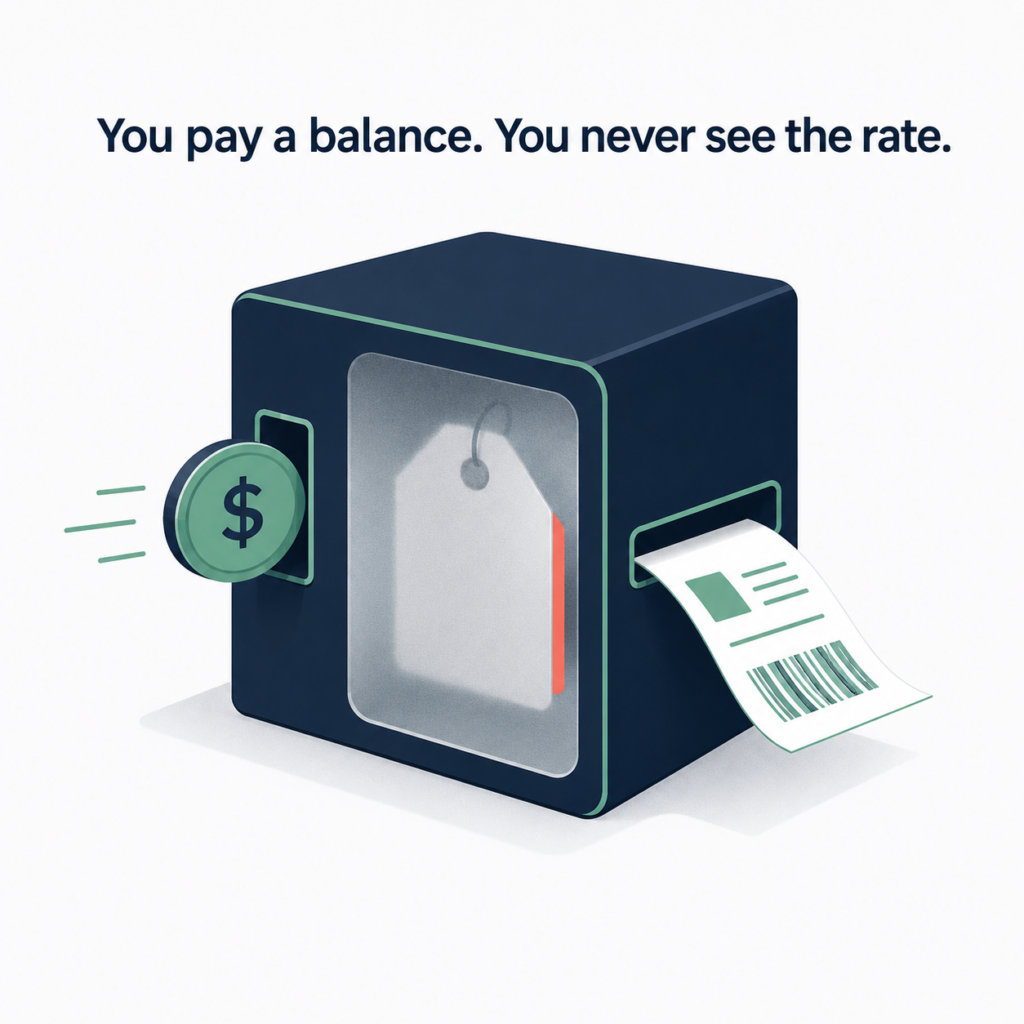
The moment you don’t own the carrier account, you’ve outsourced your pricing power. Every label that runs on a built-in rate is a label priced by a company whose margin depends on you not seeing the number.
That master agreement can also move without warning you first. ShipStation renegotiates its own carrier deal on its own schedule, and it can reprice or reweight which carrier looks cheapest based on ShipStation’s own economics with each carrier, not on what’s cheapest for your shipments. A direct account moves differently: rate changes land on your own itemized invoice, from your own carrier rep, on a schedule you can see coming.
ShipStation isn’t the carrier, so any correction on a built-in-rate label, from a reweigh to a lost package, gets processed through ShipStation’s own systems before it ever reaches whoever actually moved the box. You find out what happened after ShipStation has already decided it.
Bringing your own rates into ShipStation isn’t automatically free, either. On ShipStation’s Legacy plans, connecting a carrier account you negotiated yourself costs an extra “Your Carriers” add-on fee, $5 to $95 a month depending on plan tier, on top of your subscription.
Built-In ShipStation Rates vs. Your Own Direct Accounts
Either way, you’re running the same ShipStation, same screens, same automations. The difference is the deal behind every label.
| Built-In ShipStation Rates | Your Own Direct Accounts | |
| Account structure | The platform’s built-in carrier account. Your shipments ride on ShipStation’s master deal. | A direct carrier account in your own business name. |
| Pricing | A built-in rate you can’t see, with an undisclosed margin baked into every label. | Enterprise pricing on a pay-for-performance model, with a transparent markup you see before you commit. |
| Rate changes | Can move without notice, set by ShipStation’s own carrier agreement. | Appear on your own itemized invoice, from your own carrier rep. |
| Service level | Self-serve. You connect it and maintain it yourself. | Managed. We set up the accounts, build the routing rules, and adjust the mix as your volume shifts. |
| Support | Platform support only. No carrier rep behind your account. | A direct carrier relationship, including enterprise service lines and account-level escalation. |
What ShipStation Does Well for Canadian Merchants
ShipStation excels as a shipping management platform. It consolidates orders from Shopify and your other channels into one queue, batches label printing, applies your routing rules automatically, and keeps a clean record of every shipment. When it’s set up for Shopify correctly, it produces itemized invoices under your own business name and exports them to CSV, which keeps bookkeeping and tax recovery straightforward.
For a Canadian merchant shipping large volumes, ShipStation is more than worth it. That’s why we build on it instead of trying to replace it.
What ShipStation Can’t Do on Its Own
ShipStation’s rate shopping compares the carrier accounts you already have connected and picks the cheapest option for each order. You can set carrier selection rules that route by weight, size, and destination without touching a single label.
But the tool can only choose among the rates you’ve given it. If those are public web rates or marked-up aggregator rates, it reliably picks the least expensive option from a set that was never competitive to begin with. ShipStation’s AI-driven rate selection system also only optimizes whatever inputs already exist, and no amount of AI can negotiate a better carrier rate on your behalf.
A better rate comes from a direct carrier account at enterprise pricing, and that gets decided before any label is printed. Good automation on top of bad rates still ships you at bad rates.
Picking the right rate for each shipment also gets complicated fast, with multiple carriers, multiple service levels, and rules that shift by weight, size, and destination. Doing that by hand on every order is a full-time job with a negative return. The labor costs more than the savings it finds.
Our companion piece on Does ShipStation Rate Shopping Save You Money in Canada? breaks down exactly where that automation helps, where it quietly costs you, and how to fix the rates feeding it before you automate anything.
Does ShipStation Get Your Package Data Right?
Address classification changes your rate before you ever see a comparison, and it never shows up as its own line item. ShipStation’s own documentation states it cannot verify addresses as residential for non-U.S. countries, and that for any non-US address, it cannot currently determine the residential or commercial status, so all estimated shipping rates for non-US addresses assume a commercial address. Every Canadian address gets rated commercial by default, whether it’s a business or someone’s front porch. The residential surcharge shows up on the carrier invoice after the label has already printed and the carrier has already picked up, not before.
Package dimensions cost you twice. By ShipStation’s own documentation, when dimensions aren’t entered, ShipStation bases the rate on weight alone, so no oversize or dimensional weight surcharge appears in the number you’re shown. When a carrier catches the mismatch after the label prints, ShipStation adds its own Adjustment Processing Fee on top of the carrier’s adjustment, 20% of that amount with a minimum of $0.50 and a maximum of $5 per shipment. That fee is ShipStation’s, not the carrier’s.
Package profile accuracy and address handling are part of what we set up when we build a merchant’s ShipStation.
Which Carriers Does ShipStation Support for Canadian Users?
ShipStation connects the carriers Canadian merchants actually use: Canada Post, Purolator, FedEx, UPS, Canpar, and regional networks like Ecom Logistics and FleetOptics for dense urban routes.
ShipStation was built around US carriers, and it shows in the Canadian integrations. Canpar pickup scheduling doesn’t work smoothly out of the box, and same-day pickup isn’t available for UPS Canada through the platform. These are gaps in the default setup, not dealbreakers, and closing them is part of what turns a connected carrier into one you can actually run volume through.
ShipStation also connects a long list of US-only carriers and regional US networks that a Canadian shipper can’t use at all. Scroll the full carrier list and most of what you’ll find only matters if you’re shipping from Ohio. Working out which connections actually apply to a Canadian shipment, and which are noise, eats an afternoon the first time and then goes stale again every time ShipStation adds a new one. We track every carrier ShipStation adds and tell merchants which ones are worth connecting for their lanes.
ShipStation’s parent company, renamed ShipStation Global after merging with WWEX Group in June 2026, named its first Managing Director of Europe that same month, and CEO Tom Madine framed the move as the company stepping into “our next phase of growth.” Canada wasn’t part of that announcement. The platform runs well here, but Canada is a market ShipStation’s rates and roadmap got extended into, not the one they were built for, and merchants pay a premium for that convenience.
Does ShipStation Handle Canadian Taxes and Input Tax Credits?
Set up correctly, ShipStation generates itemized shipping invoices under your own business name, which is the documentation you need to support HST and GST input tax credit (ITC) claims, and it exports to CSV for your bookkeeper. Registered Canadian businesses recover the GST/HST they pay on expenses like shipping through those credits, so clean, correctly named invoices matter to cash flow.
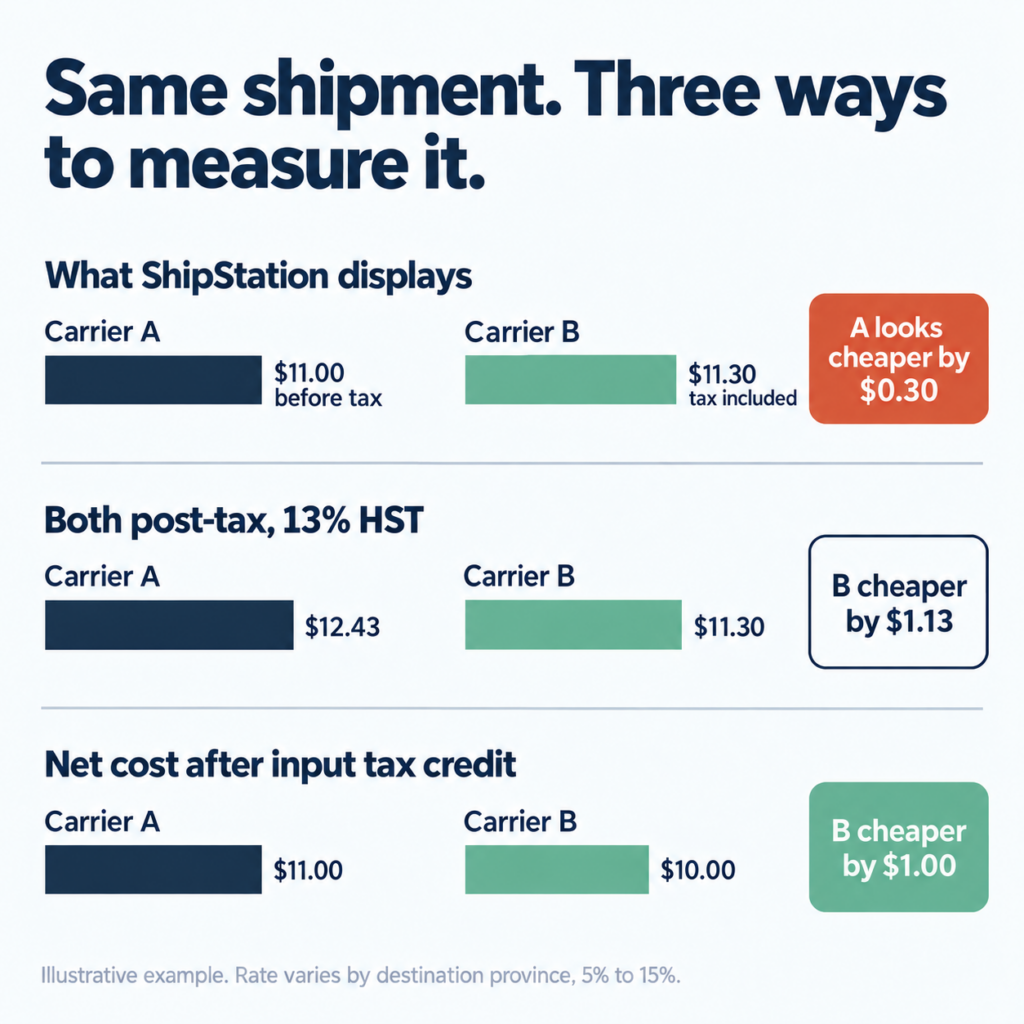
On Canadian merchant forums, one business reported tens of thousands of dollars in ITCs it couldn’t recover because its shipping invoices didn’t break out the tax. Part n Parcel invoices you directly with GST and HST broken out, so the paperwork supports your ITC claims from the first label. That’s ShipStation’s default behaviour, not a Canadian tax rule, and one more place the platform’s Canadian support feels bolted on rather than built in. Our piece on Does ShipStation Rate Shopping Save You Money in Canada? works through what the pre-tax and post-tax mismatch does to a rate comparison.
Can ShipStation Handle Cross-Border Shipping to the US?
ShipStation can generate the customs paperwork for US-bound parcels. What it can’t set is the rate or the duty treatment on those lanes. Those come from your carrier account and your brokerage arrangement, and both are decided before the shipment ever reaches ShipStation. For anything specific to duties, customs classification, or how a shipment should clear, your carrier’s brokerage team or a licensed customs broker is the right source.
How Part n Parcel Sets Up ShipStation for Canadian Merchants
Part n Parcel easily works alongside your existing ShipStation account. Here’s how it works:
- We open direct carrier accounts in your business name at enterprise rates.
- We connect those accounts inside your existing ShipStation.
- We build the routing rules that send each package to the carrier that costs least for that weight, size, and destination.
- We monitor the accounts, watch for annual rate increases, and adjust the mix as your volume changes.
Enterprise rates are the piece a merchant can’t reach alone. Carriers don’t publish their tier thresholds, but across the accounts we see, the enterprise tier opens at roughly $2M in annual spend with a single carrier.
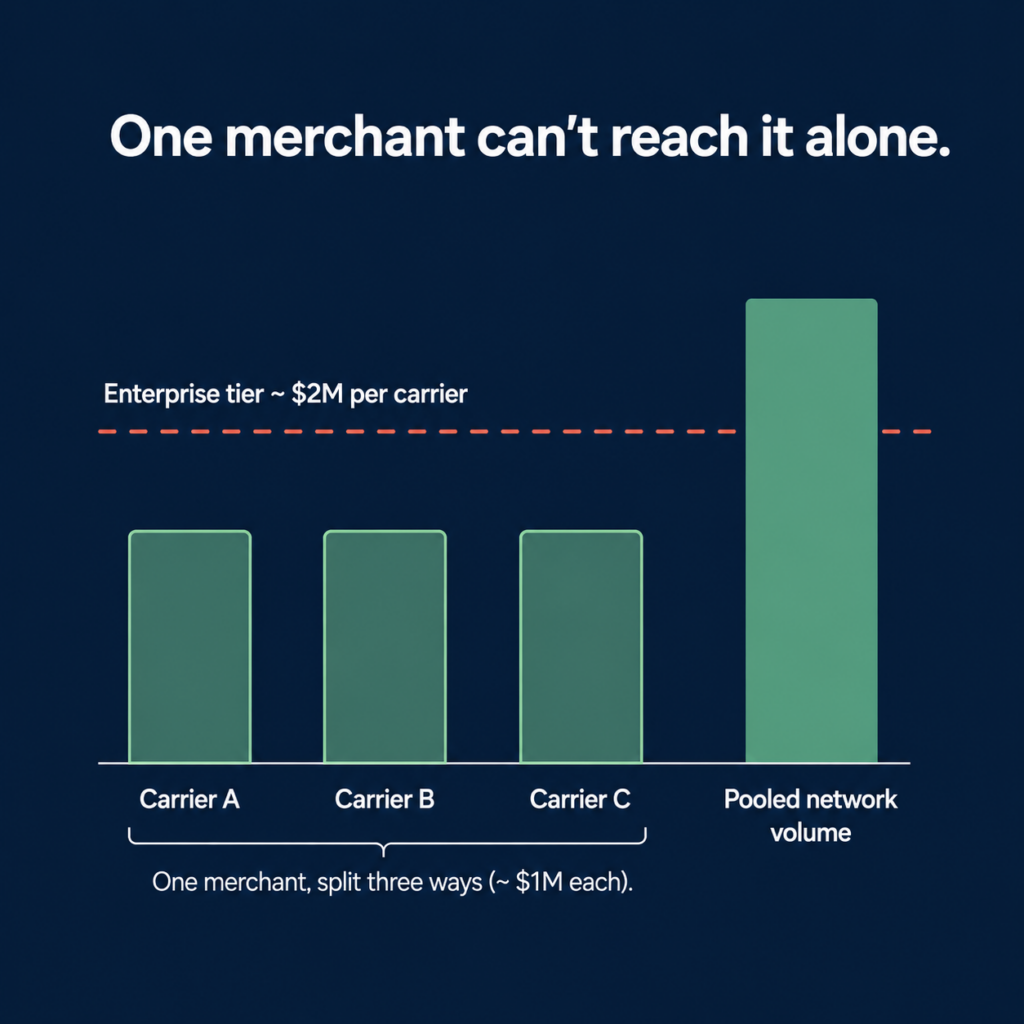
Part n Parcel’s network agreement aggregates the volume of 240+ Canadian e-commerce businesses so each one qualifies for pricing it couldn’t reach on its own, on a direct account in its own name.
Here are two examples of how we support Canadian e-commerce businesses. A PEI food producer shipping everything through a single UPS account moved onto ShipStation with a Canpar, FedEx, and Purolator mix alongside UPS, for a projected 13.1% cut to shipping costs with no drop in service. An Ottawa apparel brand shipping through Canada Post on Shopify migrated to ShipStation on a FedEx and Canpar mix with automated routing, and cut shipping costs 18.3% inside a ten-day setup.
Is ShipStation the Right Choice for Canadian Merchants?
ShipStation is a great platform for most Canadian merchants, but there’s always room to improve. The decision that moves your margin is what runs through it. Ship on the built-in rate and you’re paying a number you can’t see, on an account you don’t hold. Ship on your own direct accounts at enterprise pricing, and the same software is finally working with rates that are actually competitive.
Want to see the numbers for your own business? Send us your real invoices and we’ll show you the exact difference between what you’re paying now and what your own direct accounts would cost, all inside the same ShipStation you already use. No platform switch, no guessing, and nothing to lose except the margin you’re already giving away.